Reelwire
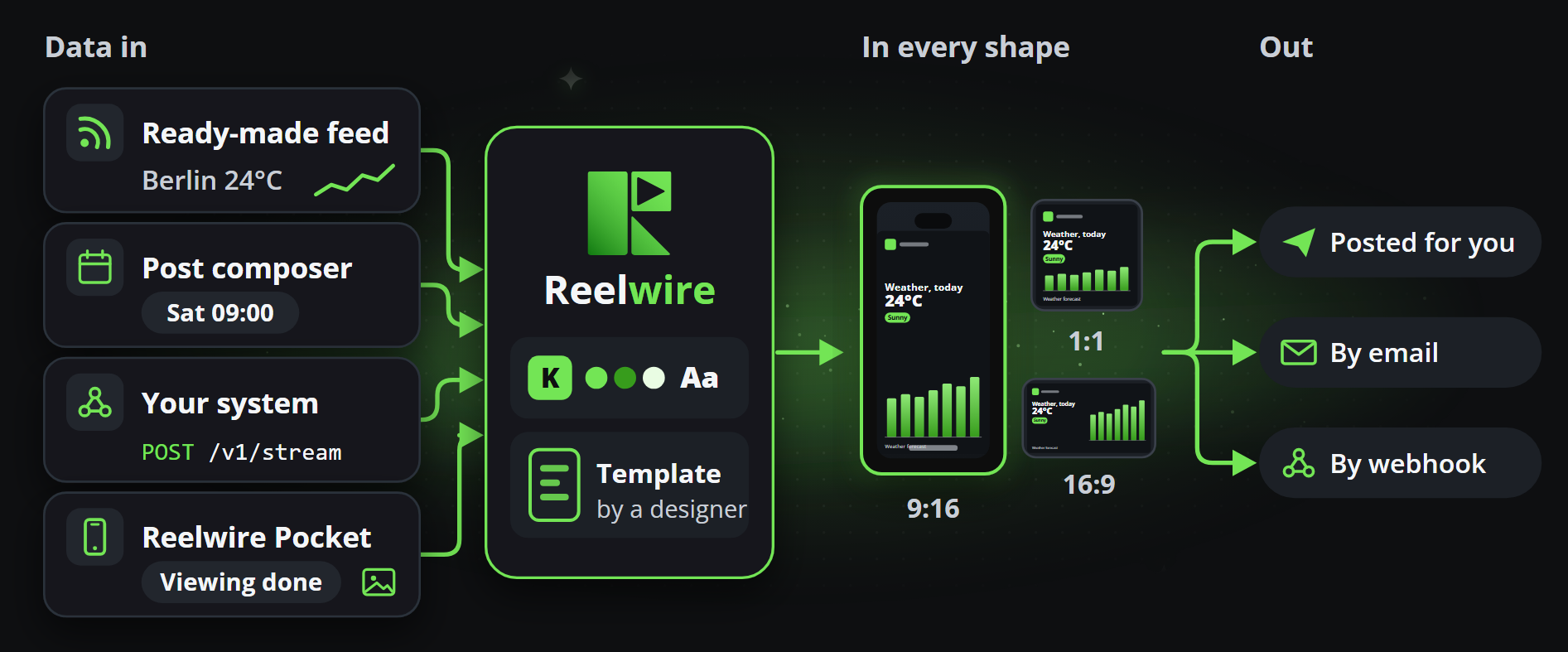
On brand. Every day. An event arrives from a feed or from your own systems, Reelwire draws it into a short video with your brand on it for each of your channels, and hands every post over when it is due: by email to the people who publish for you, or by webhook to your own system or a posting service. Reelwire makes the post; whoever receives it posts it, and says so. A channel can also have Reelwire post it there itself, through its platform connector: on Discord, Slack and Telegram with your workspace's own credentials, on every plan, and on Facebook, Instagram, LinkedIn, Pinterest, Threads, TikTok, X and YouTube through Reelwire's posting service, with a number of connected accounts on every paid plan.
What Reelwire does, in one paragraph
Something happens: a price moves, a release ships, a council meets, an offer starts, a viewing is done. It arrives from a feed Reelwire carries, from your own systems over the API, from a post written by hand in the Post composer, or from Reelwire Pocket, where somebody presses a button on their device and takes a photo of what they just did. A template drawn by a designer is filled with it, wearing your brand, in every aspect ratio and every language you publish in. Then it is handed over, for each channel, at the time you chose, after a person has cleared it where you asked for that: by email, with a post kit to post it from a phone, or to your webhook. Once it is up, whoever posted it marks it as published, by hand or by calling Reelwire back. Where a channel's platform connector is switched on, Reelwire posts it on the platform itself and marks it published with its link.
Where to start
Three short guides get you going, each in a few minutes:
| Quick start guide | What it gets you |
|---|---|
| Getting started | How a video is made, then your own brand, your own channel and a first video posted for you. |
| Using the MCP | Your AI assistant connected to Reelwire, and what to say to it. |
| Reelwire Pocket | A short video made on your device from something you just did, with one button. |
The three manuals describe everything, one way of working each:
| Manual | What it covers |
|---|---|
| AI assistants | Connecting ChatGPT, Claude, Gemini, Grok, Perplexity or Mistral, a first conversation, and every tool the MCP server offers. |
| API reference | Every route your own systems can call, what it takes and what comes back. |
| Dashboard | Every screen, in the order of the menu on the left, and how to do a thing on it. |
The quickest way in is your own AI assistant. Reelwire's MCP server works with ChatGPT, Claude, Gemini, Grok, Perplexity and Mistral: connect it, say "I'm new to Reelwire", and it sets up your brand, your channels and your first posts one step at a time, planning weeks of posts ahead and asking before it creates or spends anything. Start with the AI assistants manual: it has the configuration, a first conversation to follow, every tool the server offers and what no key may ever do.
If you prefer to click, the Dashboard manual has a page for every screen, in the order of the menu on the left, and Documentation, at the top right, opens the page of the screen you are on. Get started takes a new workspace from its brand to its first post handed over, in the dashboard or through your AI assistant.
If you want to post before setting anything up, the Guides chapter starts there. Every new workspace has a Default channel, already fed by a post list and a stream of its own, that emails you each video when it is due, to post by hand or to put into a posting service. To have posts reach a system of your own instead, receive them by webhook: to post through the platforms' APIs or a posting service's API. To have Reelwire post them itself, switch on a channel's platform connector.
If you want to see what your clips can be made from, the Catalogue has every template, with its variants and versions, and every feed Reelwire ships, each with an example video and the exact JSON it takes.
If you are writing against the API, the API reference starts at Authentication and then Sending events. The whole route list is generated from the running server, so it says what Reelwire actually serves rather than what somebody remembered to write down.
The words this documentation uses
| Word | What it means here |
|---|---|
| Brand | What a clip wears: names, colours, type, logo, and the legal line at the bottom. |
| Channel | One place posts are made for: one platform account, one language, wearing one brand, handed over by email, by webhook, by its platform connector, or any mix of them. |
| Template | The composition a clip is drawn through, made by a designer and filled by machine. Clip studio makes a clip from one straight away. |
| Stream | Where your own systems send events, rendered through one template. Made under Custom feeds. |
| Feed | Something Reelwire carries, listed under Ready-made feeds, that a channel can listen to. |
| Post list | Posts you write by hand, each going out at its own time, in the Post composer. |
| Reelwire Pocket: your business's own actions as buttons on a device; one press and a photo, a video or a few words make a clip. | |
| Clip | One rendered video. A post to three channels in three languages is three clips. |
| Post kit | The page an email hands a post over with: each channel's video to share or download, its text to copy, and the buttons to say it is up. |
| Platform connector | A channel's third way out: with credentials saved on the channel, Reelwire posts the video on its platform itself. |
| Syndication participant | Somebody outside the workspace who receives its posts, by email or webhook, to post them in its name. On Enterprise. |