Using the MCP
The MCP lets your AI assistant work in Reelwire for you. You say what you want in your own words, and it plans your posts, makes your videos and tells you what went out. You do not need to know what the letters stand for: it is the standard that connects an assistant to a service.
Connect it
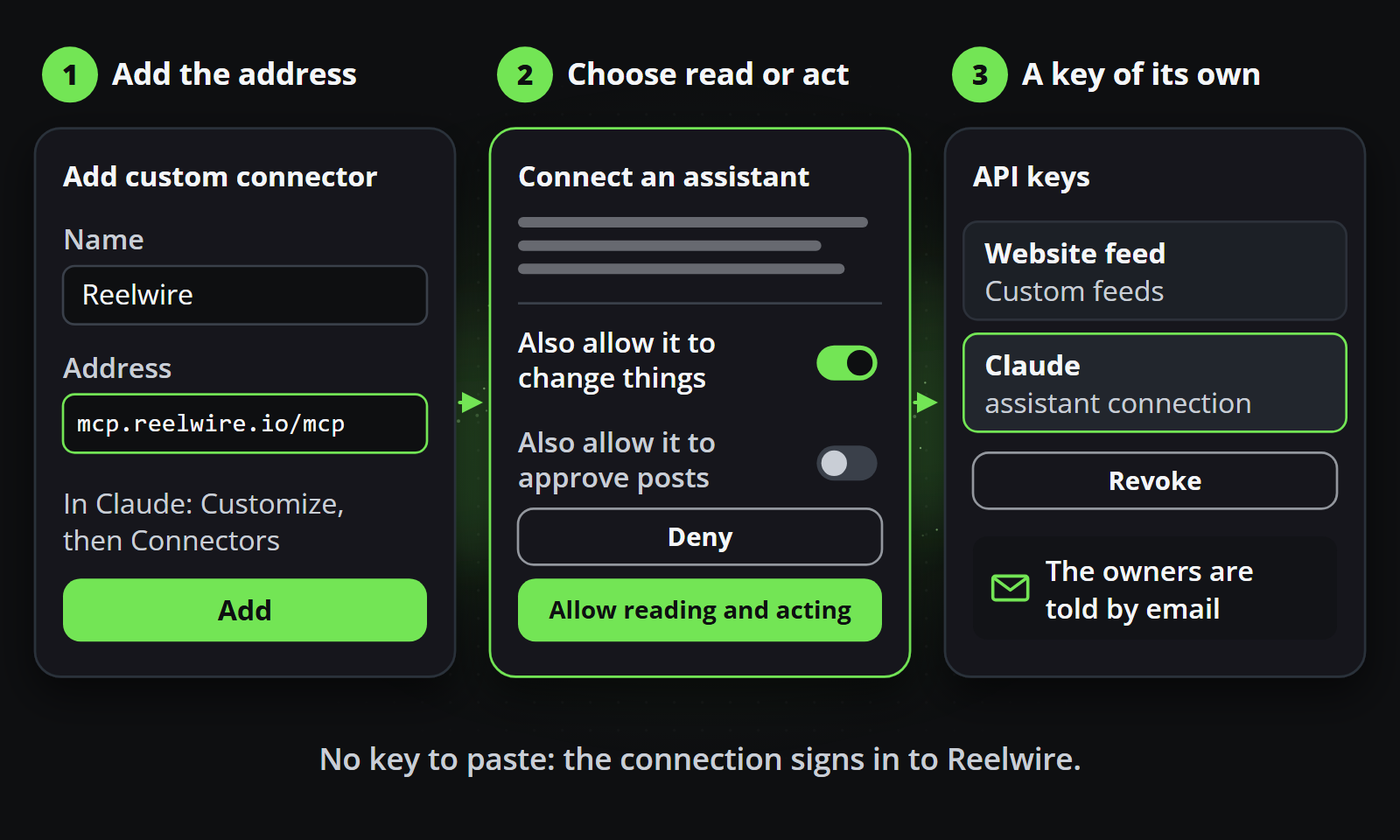
- In ChatGPT, Claude, Gemini, Grok, Perplexity or Mistral, add a custom connector with the address
https://mcp.reelwire.io/mcp. Install it shows where, in each of them. - A Reelwire page opens: sign in with your Reelwire account.
- Leave Also allow it to change things on, and press Allow reading and acting.
Then start a new chat, and switch Reelwire on for it where your app has such a switch.
Most assistants need a paid plan for a custom connector, and even where a free plan connects, it runs out of messages quickly in real work. Your assistant also asks before it uses a tool, and most let you allow Reelwire's tools once, in advance. Install it has both, for each assistant.
Say what you want
Use your own words. These are examples:
| You want to | You say |
|---|---|
| Plan ahead | Please create me 8 weeks of posts about our spring offers, and show me every post before you write it. |
| Make one video | Make me one video about our opening hours over the holidays, nothing published. |
| Brand your own video | I filmed a job on my phone. Put my logo and a title on it and add captions. |
| Look at your brand | Show me my brand kit. |
| Try a change | Show me what a darker green would look like before you save it. |
| See what happened | What went out this week, what is waiting for approval, and did anything fail? |
| Carry on later | Where did we stop last time? Plan the next weeks the same way. |
Nothing set up yet? Say "I'm new to Reelwire, set me up", and it asks how you want to work: the quick setup, which does everything in one go from your website or whatever you have and stops twice for you to look, or step by step, one thing at a time. Your first conversation goes through both.
Give it your pictures and videos
Tell it you have some. In apps that can show it, a place to drop your files appears in the chat. Elsewhere, upload them under Media and tell it their names. It can also bring in pictures from your website if you ask.
In Claude, on your phone too, switch on Code execution and file creation under Capabilities in Claude's settings, with network access: without it Claude cannot pass on a file it fetched itself and asks you to upload it by hand. Pictures, videos and other files explains it. For work with many pictures and videos, an assistant that works on your computer, Claude Code or OpenAI Codex, does best.
A post planned around a photo you have not taken yet is written all the same, and waits for it. Reelwire emails you a few days before it is due while the photo is missing.
You stay in charge
- It shows you first. A plan comes as a table you approve, where your assistant can draw one, and a video as a free picture before it is rendered.
- It remembers. Come back a week later, in any assistant connected to your workspace, and it carries on where you stopped.
- Your channels still decide. A channel that holds its posts for approval holds these too.
- Some things stay with you, such as API keys and paying for your plan: What it deliberately cannot do has the list.
Go further
- Your first conversation: the quick setup and the step by step one, with their questions and example answers.
- Working with it: worked examples, from setting up to finding out what happened.
- Getting started: what a brand, a channel and a post are.