Analytics
Analytics shows how your published posts did, side by side. It sits under Performance in the menu and is part of Enterprise. On every plan below it is not in the menu.
Where the numbers come from
Reelwire posts nothing itself, so it cannot see a post's views, watch time or likes. A post's numbers reach Reelwire only when they are sent for it. There are three ways:
- Your receiver sends them. The system that receives your webhook, and already reports each post
published, reads the numbers from your posting service or the platform and sends them with
POST /v1/posts/{postId}/metrics. See Analytics in the API manual. - You type them in. Add numbers, on any post in the second card, takes what the platform's own insights screen shows for it.
- An assistant reads them. Through Reelwire's MCP server, an assistant can read the numbers off a screenshot of a platform's insights and send them for you.
Each time numbers are sent for a post, they are kept as one reading, with the moment they were read. Sending numbers works on every plan, so a workspace that moves up to Enterprise already has its history.
Send only what the platform shows. A number left out is not the same as nought: a post with no watch time reported is not a post nobody watched.
What each platform can report
Every platform counts views, and every one counts them differently, so views are compared per platform and never added up across them. Beyond views:
| Platform | Worth sending |
|---|---|
| TikTok | Average watch time and "watched full video" (both need a TikTok business connection), shares, saves, follows |
| Instagram Reels | Average watch time, the skip rate, reach, shares, saves |
| Facebook Reels | Average watch time, reach, follows, views watched to the end |
| YouTube and YouTube Shorts | Average percentage viewed, engaged views, shares, subscribers gained |
| Watch time, impressions, reach, clicks, reactions, reshares | |
| Telegram | Views, forwards and reactions only: Telegram keeps no watch time |
Which of these your posting service can pass on differs a lot between services. The guide on posting services says which report what.
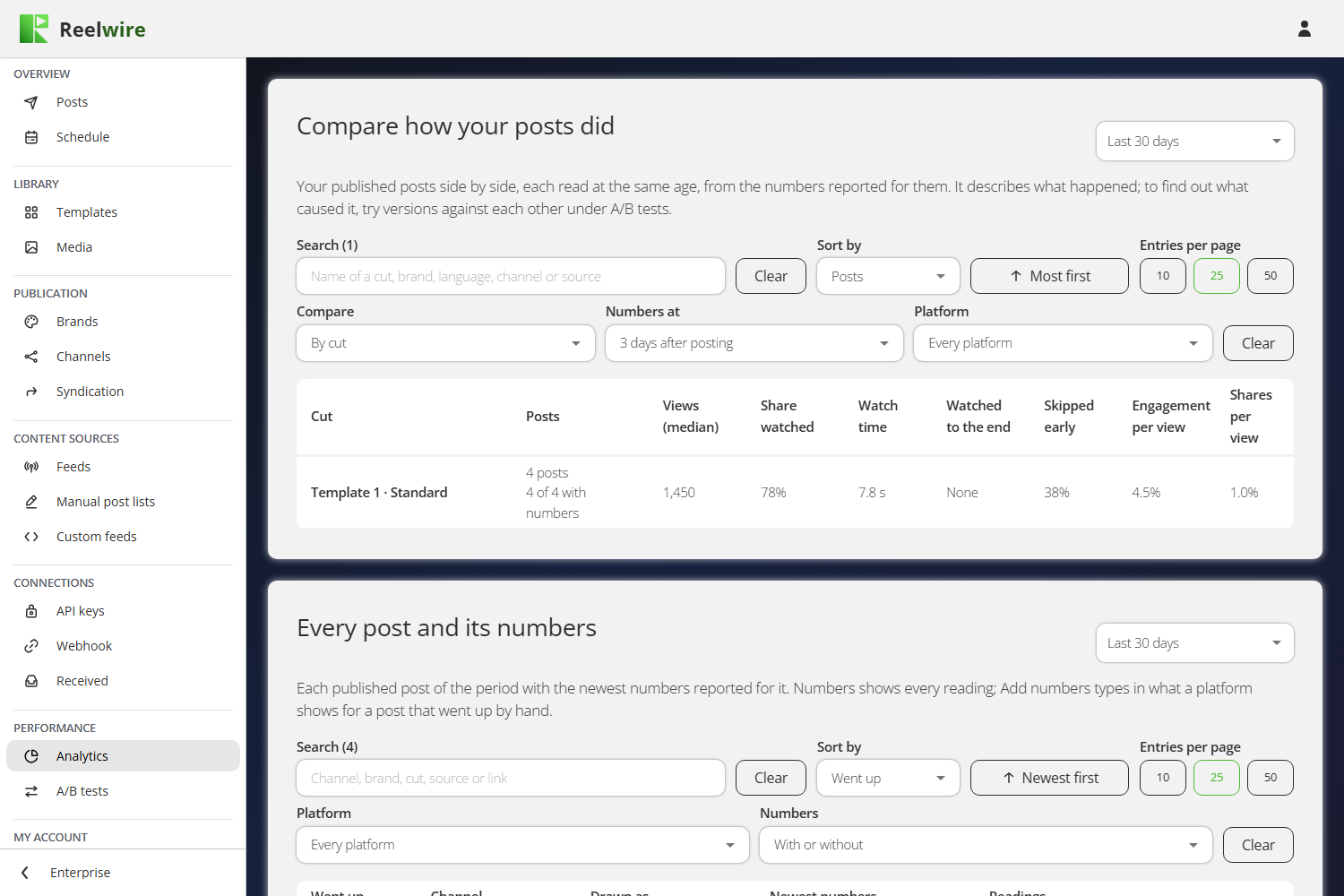
Compare how your posts did
The first card puts your published posts of the chosen period side by side. Compare decides what a row is:
- By cut: the template and the cut each post was drawn in.
- By brand, By language, By channel, By platform or By source (the feed, custom feed or post list it came from).
Numbers at decides which reading of each post counts. Posts are compared at the same age, because a post read a week after it went up has had far more time to collect views than one read after a day:
- 3 days after posting, the default. The reading nearest to 72 hours after the post went up.
- 7 days after posting, to confirm.
- The newest numbers, whatever their age, for a quick look.
A reading counts for an age if it was taken no earlier than three quarters of it and no later than three times it. A post younger than that is not counted yet.
Each row shows how many posts it holds, how many were old enough and how many of those have numbers, then:
- Views: the median, the middle post. One post in fifty travels, and an average of views would be that one post.
- Share watched: how much of the clip an average view watched. YouTube reports it; for the other platforms Reelwire works it out from the average watch time and the clip's own length.
- Watch time, Watched to the end, Skipped early, Engagement per view (likes, comments, shares and saves per view) and Shares per view: averages over the posts.
A number no post in the row reported shows as None.
If fewer than eight in ten of the posts old enough have numbers, the card says so. Reported posts are often the ones that did well, and then the rows flatter them.
This card describes what happened. Two cuts that ran on two different feeds compare the feeds as much as the cuts. To find out whether a cut or a brand makes the difference, run an A/B test.
Every post and its numbers
The second card lists every published post of the period, newest first: its channel, the cut, brand and language it was drawn in, its newest numbers and how many readings it has. Set the Numbers filter to Without numbers to see the posts nobody has reported yet.
- Numbers shows every reading of a post, oldest first, with how long after the post went up it was taken and who sent it. Remove takes one reading back. To correct a number, remove the reading and add it again.
- Add numbers takes one reading by hand. It asks for the numbers that post's platform shows, and keeps them as read at that moment.
How numbers reach Reelwire
The third card repeats the three ways above and shows the call a developer makes.