Posts
Every post, from the moment its content arrives until it is published, with a row for each of its channels. This is the daily screen and the one you land on.
A post is one piece of content: everything one feed item, one custom feed event or one post from a post list produces, for every channel that listens to it. Each channel gets its own video, in its own shape and language, wearing its own brand, and its own row here. The channels of one post are still handed over together, in one email with one post kit and one webhook call. A repost is a post of its own.
It replaced four screens that each showed one stage of the same work. Following a single story meant jumping between them, and the point of Reelwire is to post, so the post is the row.
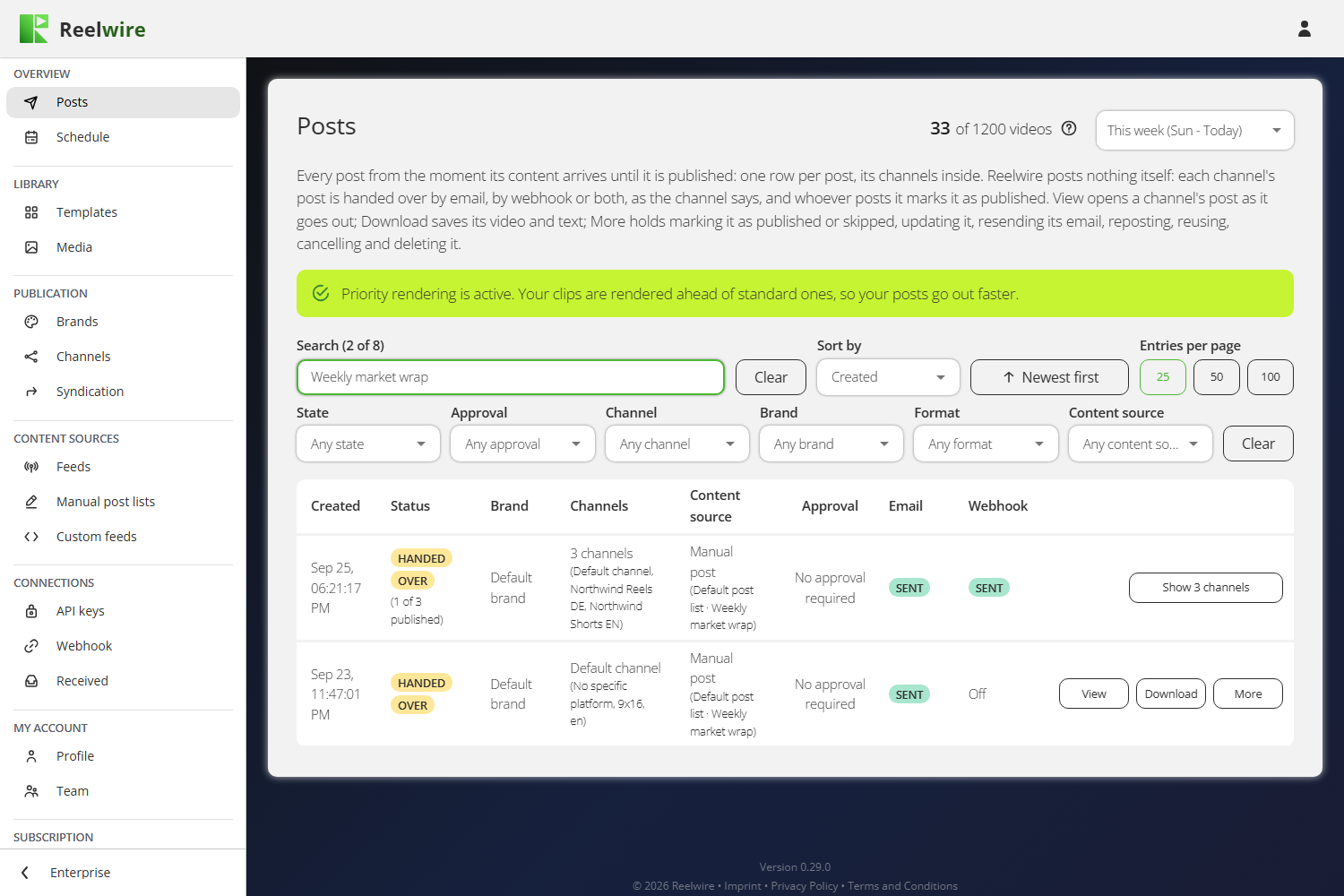
The figure at the top right counts the videos used this month against your allowance, because every channel of a post spends one. Its question mark takes you to Allowance. On Enterprise, a green line above the table says that priority rendering is on: your clips are rendered ahead of standard ones.
Following one post through
An event arrives from a feed, a post list or a custom feed. Every channel listening to that source becomes a channel of the post, and each is drawn in that channel's aspect ratio and language, wearing that channel's brand.
Reelwire posts nothing itself. When the post is due it is handed over the ways each channel has switched on: by email to you, to your webhook for your own system or a posting service, or both. Whoever receives it posts it and says so, and only then does it read PUBLISHED.
The channels of a post that need no approval are handed over together, in one email and one webhook call, once every one of them is rendered and due. One still rendering holds the others back for at most 30 minutes; then they go without it, and it follows on its own. A channel that asks for approval is handed over on its own, once somebody approves it. See Channels.
Each row says when the post was created, its status, the brand, the channel, the content source with the feed, stream or post list it came from, where its review stands, and how its email and its webhook call went.
| Status | What it means |
|---|---|
| ACCEPTED | The content is in and is waiting its turn to be handed to a render machine. |
| AWAITING RENDERING | In line to be drawn. Whether it waits in Reelwire's queue or at the render machine, it reads the same. |
| RENDERING n% | Being drawn right now. PRIORITY RENDERING means it was queued with priority rendering. |
| DOWNLOADING | Drawn, and being copied into your storage. |
| AWAITING APPROVAL | Waiting for a person to clear it. |
| SCHEDULED | Waiting for its time, or for the other channels of the post to be rendered, so they are handed over together. Nothing is wrong with a post that sits here. |
| HANDING OVER | Being handed over now: by email, to your webhook, or both, as the channel says. Tried again on a set schedule if it does not get through. |
| HANDED OVER | Handed over, and not marked as published yet. Whoever received it posts it, then marks it as published: in the post kit from the email, here under More, or through the API. |
| PUBLISHED | Somebody said it is up. Where they gave its link, View and download has View the post. |
| SKIPPED | Handed over and deliberately not posted. It can still be marked as published. |
| UPDATING | A change to its text or video is being handed over, the ways the post was. The post reads as before until it has gone. |
| DELETE REQUESTED, DELETED | Somebody asked for it to be taken down, and that was handed over. It reads DELETED once whoever posted it says it is gone. |
| REJECTED | Somebody rejected it, so it was not handed over. |
| RENDER FAILED, POST FAILED, UPDATE FAILED, DELETE FAILED | It stopped, and the row says why. POST FAILED is a post that could not be handed over after every attempt, or that whoever posts it said could not be posted. A failed update or delete leaves the post as it was. |
| CANCELLED | Stopped before it was handed over: somebody pressed Cancel, or its clip was deleted or removed to make room. |
Hover a status for the same explanation in the product.
Channel names the channel with its format, shape and language under it.
The Approval column says where the channel's review stands: Approve and Reject while it waits for somebody who may approve, then Approved or Rejected with who decided, or No approval required where the channel does not ask for a reviewer. Both buttons ask once more before they act, because neither can be taken back. See Approvals.
The Email and Webhook columns say how each way out went:
| It reads | What it means |
|---|---|
| Off | The channel does not have that way switched on. |
| Not yet | Switched on, and the post has not been handed over yet. |
| Sending | On its way now, the first time or again. |
| Retrying | It did not get through, and is tried again on a set schedule. |
| Sent | It got through. |
| Failed | It did not get through after every attempt. The row says why. |
Filters answer from what is there
The period at the top opens on This week (Sun - Today), worked out from your own clock. A post is in a period when anything happened to it there, so one created last week and published an hour ago is in "Last 60 minutes". If something is missing, choose a longer period before anything else.
The State filter groups the statuses (Rendering, Awaiting approval, Scheduled, Handing over, Handed over, Published, Skipped, Failed, Rejected, Cancelled, and Deleted or delete requested), each with a live count of the rows in it, so "Failed (0)" says there are none. The Approval, Channel, Brand, Format and Content source filters offer only what the period holds. The search box reaches the caption, the channel, the brand, the feed, stream or post list, and the template. Sort by Created or by Last update.
The Archive filter shows the Active rows, which is where the list opens, or the Archived ones: the rows somebody filed away with Archive under More. It is the one filter with no "any", and whether a row is archived is not a column.
The filters do not persist between visits. A filter left in place is the commonest way to conclude that your data has disappeared.
View and download, and More
Every row has View and download and More.
View and download opens the channel's post as it goes out, with everything its post kit has for posting it, in the kit's order: a first card, Ready to post, as it reads now, with the three guides; then A prompt for your AI assistant, one for every post shown, folded, with Copy; then a card for each post. A post's card is headed by the channel, the platform, shape and language, its Status in the kit's words, and View the post once somebody gave the post's link. Under it, one under the other and each the card's full width: Share (on a phone or computer that can hand a file to another app; one press opens the share sheet), Download video, Download cover and Download text, which saves every text of the post as a JSON file; then the clip at its real shape; then Title and the title where the platform has one, and the text as it goes out, the caption with the brand's line, the link and the hashtags, each with Copy. A channel on No specific platform shows its text in all three lengths, one for each kind of platform. That is the screen to check before approving something. It is greyed while there is no video to give: the post is still rendering, its render failed, or its clip was removed to make room in your storage (see Media).
More holds the other actions, only the ones that apply to that channel, in four groups with a line between them. The first, on every channel, is Reuse: it starts again from what the post was made from, so a small mistake in a finished video is one change rather than the whole template filled in again. It asks which way:
- As a new post opens Add new post in a post list, already filled with the post's template, variant, build and content, every language included, and named "Copy of" the original. A post from a post list goes back into that list; one from a feed or an API stream goes into your first post list. Change what needs changing, then post it.
- As a video only opens Direct export with the same content, brand, shape and language, to render the video again and download it. Nothing is posted.
The original post stays as it is either way. Then what you say about the post:
- Mark as published says the post is up. It asks for the link to the post, which you may leave empty. With the link, View and download has View the post, and any later update or delete carries it, so whoever posted it can find it again.
- Skip this post says it was handed over and will not be posted. It reads SKIPPED, nobody is reminded about it, and it can still be marked as published later.
- Mark as deleted says it was taken down, once a delete was asked for.
Then the requests Reelwire sends, each only the ways the channel has switched on, Email, Webhook or both, and never one that is off:
- Resend post request hands the post over again, as it reads now: its email with a post kit, and its webhook call with a new delivery id so the receiver acts on it again.
- Send update request changes its text or its video. See below.
- Send delete request asks for it to be taken down. See below.
- Cancel stops everything still to happen to this channel's post before it is handed over: a render in progress is stopped, an approval request is withdrawn, and it is not handed over. The post's other channels go on.
And last:
- Archive files the row away: it leaves the list and waits under Archived in the Archive filter. Nothing else changes, so a post still on its way carries on. On an archived row, the same place says Unarchive, which brings it back. Neither asks first, since either can be undone.
Mark as published, Skip this post, Mark as deleted, Resend post request and Cancel each ask once before they act, and Mark as published, Cancel and Mark as deleted cannot be undone. There is no Repost: Reelwire posts nothing, it sends post requests, and sending one again is Resend post request. Post a video by hand goes through the email, the post kit it opens and each platform's steps.
More is offered only to somebody holding the Operations permission. A reviewer who holds Approvals and nothing else sees View and download, and Approve and Reject on the channels waiting for them.
Updating a post that was handed over
Send update request opens the channel's post as it was handed over: its title where the platform has one, its video, its text, the brand's description, the hashtags and, where the platform posts one, the link. Keep the video, or upload or choose another from the media library to post in its place.
Send update request hands the change over the ways the channel has switched on: its email goes as "This post changed", with a post kit holding the new text and, where you chose one, the new video, and your webhook receives the change. Reelwire changes nothing where the post is: whoever posted it changes it there. The post reads UPDATING until the change has gone, and then shows the new text.
The caption counter in the Send update request dialogue is not the platform's limit. It is the platform's limit less the brand's description, less the link where the platform posts links, and less the hashtags unless this channel posts them as the first comment. Counted that way, a caption that fits here is not shortened on the way out.
Changing the brand description or the link in this dialogue changes this post only. It does not change the brand.
A channel on No specific platform has three captions in the dialogue: one for Telegram, one for Instagram, TikTok, Facebook Reels and LinkedIn, and one for YouTube and Facebook Feed.
Deleting a post
Send delete request asks you to type the channel's name, then Send delete request again. Reelwire posts nothing itself, so it cannot delete anything either: it asks whoever posted it to take it down, the ways the channel has switched on. Its email goes as "Please take this post down", with a post kit naming where it was posted where somebody gave the link, and your webhook receives a delete.
The channel then reads DELETE REQUESTED until somebody says the post is gone: Mark as deleted in the post kit from that email, Mark as deleted under More, or your webhook's receiver reporting it. Then it reads DELETED.