Your first conversation
Once your assistant is connected, one sentence is enough to start:
I'm new to Reelwire. Tell me what it can do for me, then set me up one step at a time and ask before creating anything.
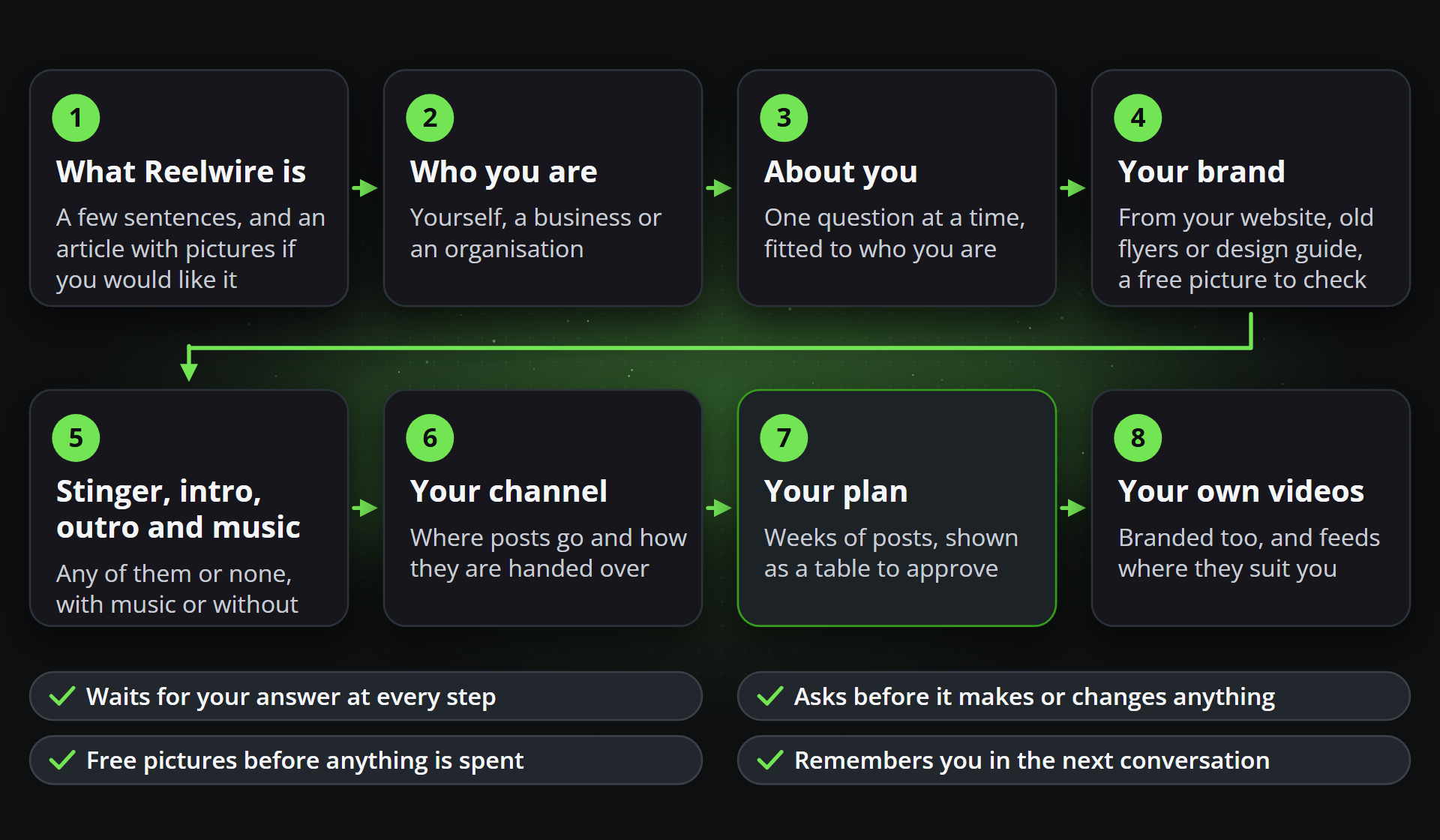
The assistant then runs the guided setup. It asks one thing at a time, waits for your answer, and only then moves on. It never creates or changes anything without your yes, and before a single video of your month is spent you see a free picture of the post in your own brand. This page walks through every step, with the kind of answer that works, the prompts people use most, and a whole first conversation as an example.
The steps
1. What Reelwire is
In a few sentences, the assistant tells you what Reelwire does for you and how a finished video is put together: a short stinger naming the kind of post, an intro revealing your logo, the clip itself, and an outro with your website and a call to action. It offers a short article with pictures on exactly that, How a branded short video is put together, and gives you the link only if you want it.
Yes, show me the article first.
2. Who you are
Next it asks who the videos speak for, because everything after is fitted to the answer. It may offer a guess from what your workspace shows, such as its plan and how many people are in it, for you to confirm.
| You answer | What changes |
|---|---|
| Myself: a creator, coach, freelancer or expert | A personal brand with you as the presenter, one channel, four to eight weeks of posts, and evergreen feeds (a quote, a fun fact, a question of the day) if you want them between your own posts |
| My business: owner-run or a small team | Your brand built from your website or your old flyers, one channel, two or three months of posts about your business |
| An organisation: a marketing or communications team, or an agency for clients | A pilot: a brand from your design guide (one per client for an agency), channels that hold every post for approval, and four weeks of posts to show your approver |
It's my business, a car repair workshop.
3. About you
Then the questions for your answer, one at a time: for a business what it does and where, its customers and accounts, whether a logo and a design exist, its year (seasons and offers), how often to post and whether somebody else checks posts. Answer in your own words; there are no wrong ones.
We're Becker's Garage in Augsburg, family-run since 1998. Mostly private customers, a few company fleets. We have a logo but no real design. Winter tyres in October, air conditioning checks in spring.
4. Your brand
The brand is the look every clip wears: logo, colours, fonts, the presenter and the lines at the top and the foot. Give the assistant what you have:
- your website, which it reads for the logo files, the colours, the typefaces and your details;
- pictures of old flyers, adverts or posts, dropped into the chat, which it looks at itself;
- your design guide, with the logo and font files, if you are an organisation.
It proposes the brand in a few lines and writes it only after your yes, then shows you a free picture of a post wearing it. If you like none of the styles it shows you, it asks whether you would like a design made especially for you, and on your yes sends Reelwire the request; Reelwire answers you by email.
Here's our website: beckers-garage.example. The logo is white, so it needs a dark background.
5. Stinger, intro, outro and music
Once the brand is yours, the assistant asks which of the three parts you want around your videos, any of them or none, and whether your videos play with music or without:
| Part | What it is | Length |
|---|---|---|
| Stinger | A title card at the very start naming the kind of post, such as TIP or NEW | About two and a half seconds |
| Intro | Your logo revealed with your slogan | About four seconds |
| Outro | An end card with your website, a call to action and how to reach you | Five to six seconds |
Just an outro with our website and phone number, and quiet music under everything.
It then makes what you chose with you: two or three styles as free pictures in your brand, the words each needs, then one render each, which counts as a video of your month. It sets each part on the brand and switches it on, switches off what you did not want, and sets your music: a file of your own that you hold the rights to, or music made with your own AI music service, playing under the clip alone or under the parts you chose too. Without music, it switches the soundtrack off.
6. Your channel
A channel is where posts go and how they are handed over. For somebody posting by hand, the assistant suggests one channel in 9:16 on No specific platform: one video that suits every platform for short vertical videos, handed over by email with everything needed to post it, at one video a post. An organisation's pilot gets one or two channels per account and language, each holding every post for approval, with colleagues invited where needed.
One channel is fine. Send me the posts by email.
7. Your plan
The main step. The assistant works out the times your posts can go out: as many as your month's videos pay for (every channel a post goes to renders it once), never more a day than suits a new account (one a day in its first week, two in weeks two and three, three from week four), and only between 06:00 and 20:00 where your audience lives. Then, with you:
- it proposes the themes week by week, fitted to your business and its season;
- it shows you two or three styles for each kind of post in your brand, as free pictures, and you choose;
- it drafts each post. General know-how of your trade it may write; every price, offer, date, figure and quote comes from you, and it tells you which posts need your photos and by when;
- it checks every post against its template and shows you the whole plan.
In Claude, ChatGPT and other apps that show MCP Apps, the plan appears as a table under the assistant's answer:
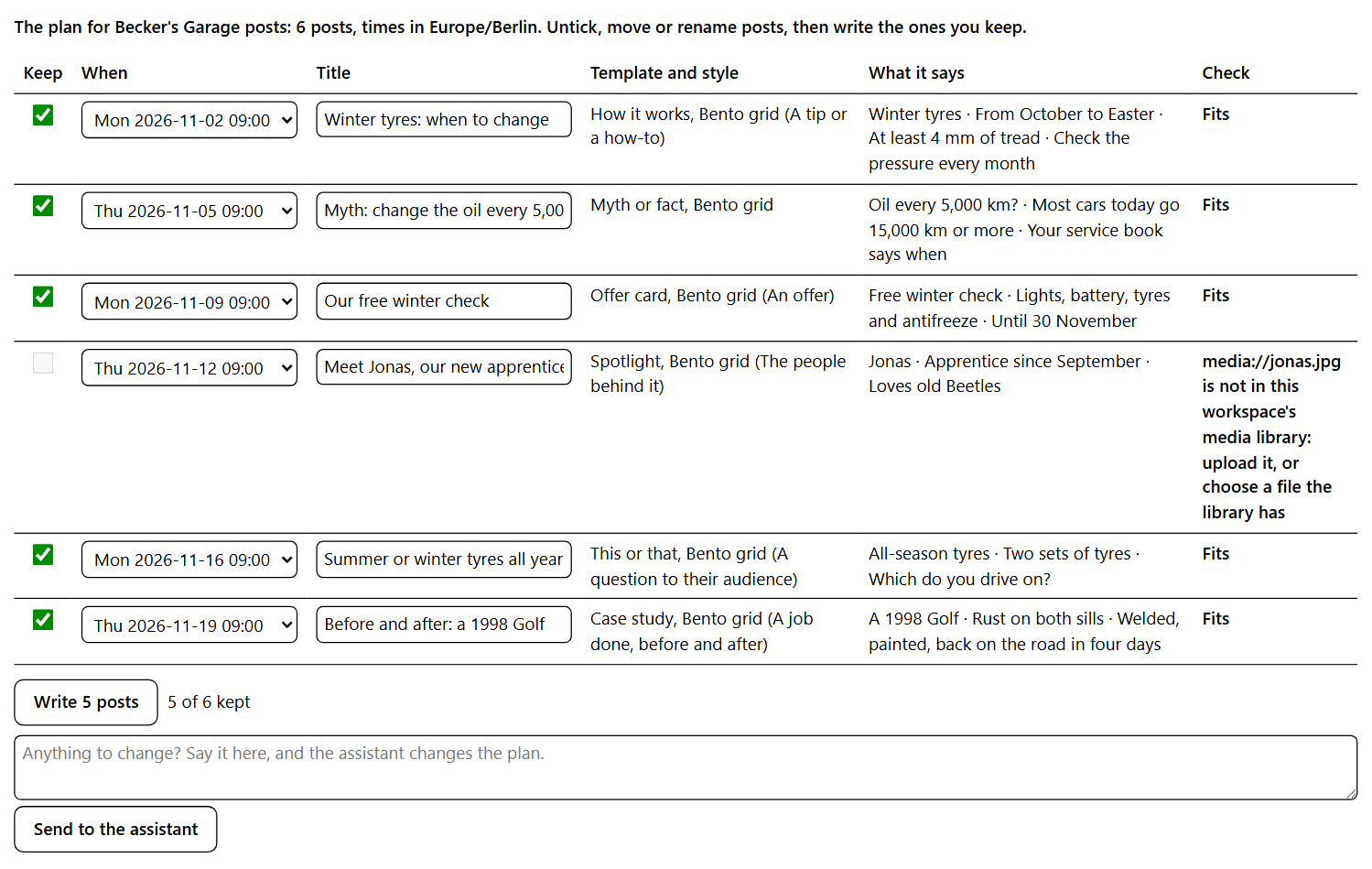
- Keep ticks a post in or out. A post that does not fit its template, such as one whose photo is not in the media library yet, cannot be ticked until it is fixed.
- When moves a post to any other time of the plan.
- Title renames it; the title is yours to find it by and is not drawn on the clip.
- Check says whether it fits, or what is missing.
- Write writes the posts you keep, all of them or none, and tells the assistant what was written.
- Send to the assistant asks for a change in words, and the assistant shows the plan again.
Elsewhere the assistant shows the same plan as a list and writes it on your clear yes. Either way you see the posts afterwards on the Schedule screen, and each one is handed over when it is due.
Twelve weeks, three posts a week at 8:30 in the morning. Mostly tips, an offer once a month, and a question to our followers every other week.
8. Your own videos, and feeds where they fit
Send what you film on your phone and the assistant puts your brand on it with the Overlay template: your logo, a title and captions, as a post in the plan or a video to download. Ready-made feeds that post on their own are offered once, and only where they suit you: evergreen ones for somebody posting as themselves, and live data for a business or organisation in finance, tech and industry, public bodies, real estate or pharmacies. An organisation hears once which Enterprise features fit what it described, with the contact link.
Coming back
The guided setup remembers what you told it: who you are, your business, the parts and the music you chose and where your audience lives. Start a new conversation a week later, in any assistant connected to your workspace, and it greets you, says in a sentence what it remembers for you to correct, and goes on from where you stopped. When the posts you planned run to two weeks or less, it offers to plan the next weeks the same way.
Where did we stop last time?
Plan the next six weeks the same way as before.
We've moved to Munich. Remember that from now on.
Example prompts
Paste one and change the words to yours. They say what you want, not which tool to use: choosing the tool is the assistant's job.
Starting
| To | Say |
|---|---|
| Begin, whoever you are | I'm new to Reelwire. Tell me what it can do for me, then set me up one step at a time and ask before creating anything. |
| Set up a business | I run a car repair workshop. Here's my website. Build my brand from it and plan my posts for the next three months. |
| Post as yourself | I'm a fitness coach and post as myself. Help me make a personal brand with me in the videos and plan six weeks of posts. |
| Run a pilot for a team | I'm in the marketing team of a bank. Set up a pilot for our retail brand from our design guide, with every post approved before it goes out. |
| Work for clients | We're an agency. Set up a brand for each of our three clients and one channel each. |
Your brand
| To | Say |
|---|---|
| Use your old material | Here are three of our old flyers. Use their colours and fonts for my brand. |
| See before choosing | Show me my brand in two or three styles before we choose one. |
| Ask for your own design | None of these styles feel like us. Can we get a design made especially for us? |
| Check the logo | Our logo is white and made for a dark background. Make sure it reads on every post. |
Stinger, intro, outro and music
| To | Say |
|---|---|
| See them first | Show me what a stinger, an intro and an outro would look like in my brand, then help me choose. |
| Only an end card | Just an outro with my website and phone number, no stinger or intro. |
| Your own music | Put music under the videos. Here is an MP3 we hold the rights to. |
| No sound | No music, please. Most of our customers watch without sound. |
The plan
| To | Say |
|---|---|
| Set the rhythm | Plan my next twelve weeks, three posts a week, mornings at 8:30. |
| Choose the mix | Mostly tips, an offer once a month, and a question to our followers every other week. |
| Approve it first | Show me the whole plan as a table before you write anything. |
| Change a post | Move the post about winter tyres to Friday, and leave out the one about Jonas until I have his photo. |
| Your photos | Which posts need my photos, and by when? |
Day to day
| To | Say |
|---|---|
| Brand your own video | I filmed a job on my phone. Put my logo and a title on it and add captions. |
| One video to download | Make me one video about our opening hours over the holidays, nothing published. |
| What happened | What goes out this week, what is waiting for approval, and did anything fail? |
Clients that show MCP prompts also list ten ready-made ones beside the server, such as Get started with Reelwire and Plan my next months of posts; Start here lists them all.
A first conversation, as an example
Shortened, and with the assistant's side in brief: your assistant puts every step in its own words.
You: I'm new to Reelwire. Set me up one step at a time and ask before creating anything.
Assistant: Explains in a few sentences what Reelwire does and how a video is put together, and asks whether you would like to read a short article with pictures first.
You: No, let's go.
Assistant: Asks whether the videos speak for you yourself, for your business or for an organisation, guessing a small business from your plan.
You: My business. Becker's Garage, a car repair workshop in Augsburg, family-run since 1998.
Assistant: Asks about your customers, whether you have a logo and a design, your busy seasons, how often to post and whether anybody else checks the posts, one at a time.
You: Mostly private customers. We have a logo. Winter tyres in October. Three posts a week, nobody else checks.
Assistant: Reads beckers-garage.example, proposes the brand (name, colours, typeface, logo, the lines at the top and foot), and after your yes shows a free picture of a post wearing it.
You: Looks good, but darker.
Assistant: Changes it, shows it again, then asks which of a stinger, an intro and an outro you want, and whether the videos have music.
You: Just an outro, with quiet music.
Assistant: Shows three outro styles as free pictures, makes the one you choose, sets your music and switches both on. Then suggests one channel handed over by email.
You: Fine.
Assistant: Works out twelve weeks at three posts a week in Augsburg's time, proposes the themes week by week, shows two or three styles for each kind of post, drafts the posts and shows the plan as a table.
You: Untick the post about Jonas, move the winter check to a Monday, and press Write.
Assistant: Tells you thirty-five posts are written, where to see them, and that each comes by email with everything needed to post it when it is due.
Good to know
- What it costs. Free pictures are free. Every render, a post going out or a stinger, intro or outro being made, counts as one video of your month, and the assistant says so before it spends one.
- Your facts stay yours. The assistant may write general know-how of your trade, never your prices, offers, dates, figures or quotes: those it asks you for.
- The key it needs. Brands, Channels, Post composer and Clip studio, with Ready-made feeds where feeds are wanted. Connecting from claude.ai or ChatGPT with reading and acting gives it all of these.
- Music made with AI uses your own AI music service, its key saved on the API keys screen by somebody signed in.
- Where you stand is read exactly as the dashboard's Get started reads it, so the Default brand and Default channel every new workspace starts with count as done only once somebody has made them their own.
- What it remembers is advice for the guided setup and nothing else: no part of Reelwire decides anything by it. To change it, tell the assistant what changed.
Working with it goes on from here: your own data, writing and changing posts, finding out what happened, making a single clip, making pictures and music with AI, and syndication.