API keys
API keys, under Connections, holds the keys your own systems sign in to Reelwire with: a script sending events to a custom feed, a receiver reporting posts back, a publishing tool, and an AI assistant connected over MCP, which uses the same keys. Keys are on every tier, Free included.
Only the owner and those holding the Administration permission can open it. Its first card, API keys for Reelwire, described here, holds the keys your own systems use to reach Reelwire. The four cards below it, API keys for AI text and font generation, API keys for AI image generation, API keys for AI video generation and API keys for AI music generation, hold the other direction: your keys for the AI services the AI assistant makes pictures, videos, music, fonts and texts with. They are described on that page.
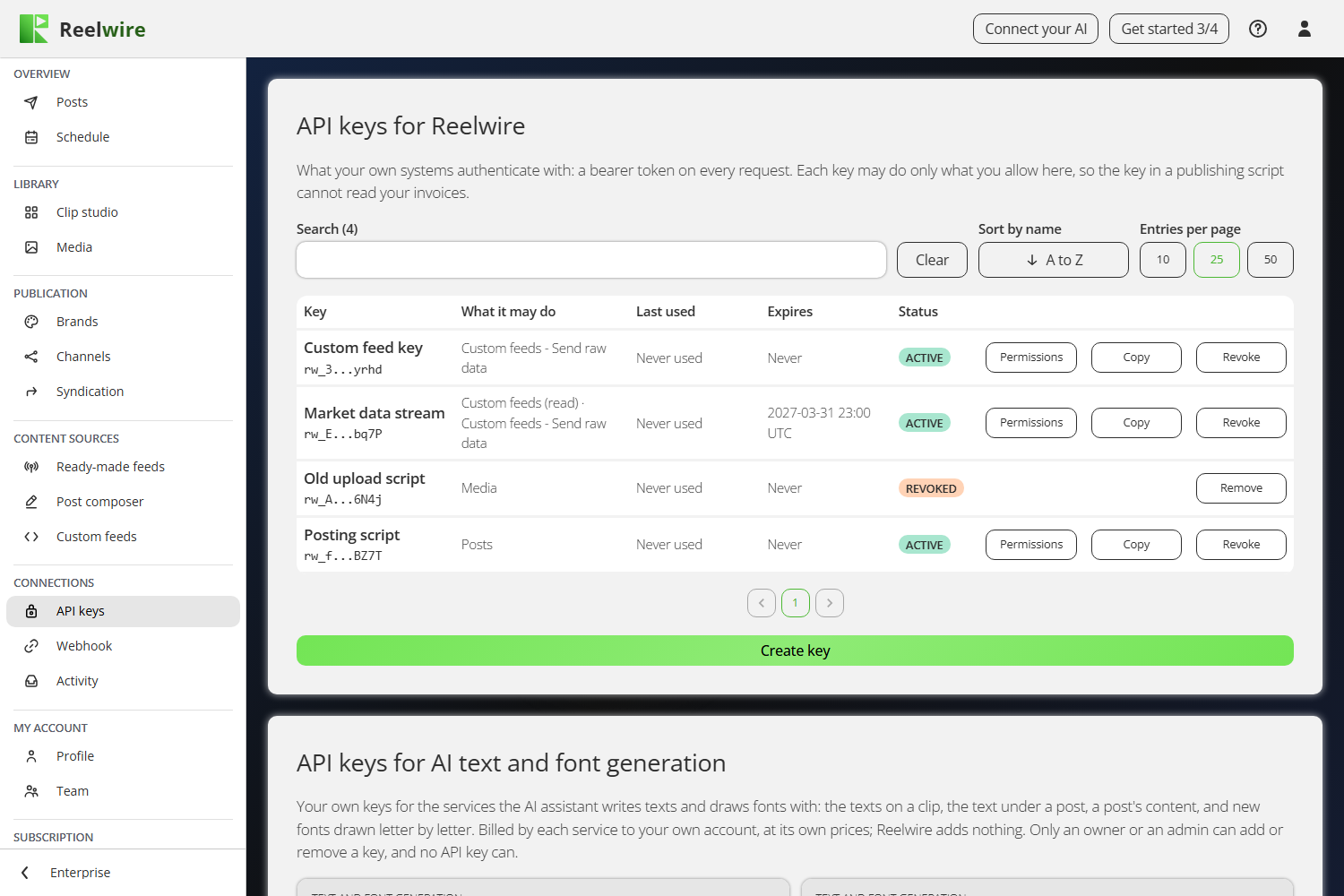
A key is a bearer token your own systems authenticate with. Each key may do only what you allow, so the key in a publishing script cannot read your invoices.
The list
The list shows each key's name and the first and last four characters of its secret, what it may do, when it was last used, when it expires and its status: ACTIVE, REVOKED or EXPIRED. A key still working has three buttons, Permissions, Copy and Revoke. The search above the list reads the names, those characters and the permissions.
Making a key
Create key, under the list, asks for a name (up to 80 characters), when the key expires, then what the key may do. The permissions are grouped under the same headings as the menu on the left, and every area has two boxes, Read and Write. Nothing ticked is no access, and a key with nothing ticked at all cannot be created.
Ticking Write ticks Read with it and locks it. That is not the screen being fussy: a key that may change a thing may already look at it, so leaving Read tickable underneath Write would let you untick a permission the key still holds.
Two boxes are given only by somebody who holds what they open: Write on Posts - Approvals by somebody with the Approvals permission, and Read on Plan by the owner, since the plan includes the prices and the next invoice. For anybody else the box is greyed, with an amber note under the row saying who may tick it. A key that already holds one keeps it when somebody else edits it, and they may take it away, not give it. An AI assistant connected by a person gets what that person could give a key, and no more.
Where an area has nothing to read, its Read box is greyed. Send raw data is the one: it is a push, and there is no route behind it to look at. Where an area has nothing a key may change, its Write box is greyed: Schedule and Activity are records to read, and a key may read your Allowance and your Plan, but buying, keeping or giving back anything moves money, so it needs a person signed in. An area your plan does not include is not offered at all: Syndication below Enterprise, Team on Free and Individual.
Whatever you choose, no key can create or revoke keys, sign anybody in, or reach another workspace.
The secret is shown in a dialogue that opens as soon as the key is made, Your new API key, with Copy beside it; I have saved it closes it. The owner is emailed about every new key, and so is whoever made it; the email names the key, never its secret.
Showing a key again
Copy on a key's row shows it again, after you type the password you sign in with and press Show key: then the key appears with Copy beside it. Only people who may make keys can do this, wrong passwords count towards the same limit as signing in, and every key shown again is written to the workspace's audit trail. The key is kept encrypted for this; requests are still checked against its fingerprint alone. A key made before keys could be shown again was kept as a fingerprint only, so its Copy says it cannot be shown: make a new key, put it where the old one is used, then revoke the old one. An AI assistant's connection has no Copy: its token renews itself every hour.
Revoking and removing
Revoke asks once more, then the key stops working immediately and stays in the list with its last-used date, which is what tells you whether the key you just killed was still in use. A revoked or expired key then has Remove in its row: it asks once more and takes the line off the list for good. When it was last used stays in the workspace's audit trail. Revoking an AI assistant's connection ends it: the assistant has to connect again.
Expiry, and changing a key
A key can expire by itself. Choose Never, a period (1, 7, 30 or 90 days, or a year) or an exact date and time in UTC, the same picker a post's schedule uses. At that moment the key stops working exactly as if it had been revoked, and its row says EXPIRED instead of REVOKED, so you can tell a key that ran out from one somebody turned off. With an expiry set, Email a reminder before it expires sends a reminder a week before and again a day before, to the owner and everybody with the Administration permission, so a new key is in place before the old one stops.
Permissions on a key still working changes its name, its expiry, its reminder and what it may do, and Save permissions keeps the change. An expired key cannot be brought back; create a new one.
An AI assistant's connection
A connection made by an AI assistant over MCP is a row of its own that renews itself: its expiry reads "Renewed by the assistant", and there is none to set. It has no Permissions button either: it may do what was agreed when it connected, never more than the person who connected it could give a key, checked again every hour as it renews. It never holds Write on Team or on Webhook, and approves posts only where the person connecting it switched that on: those stay with a key made here by hand. To change what it may do, revoke it and connect the assistant again. How to connect one is in Install it, in the AI assistants manual.
Naming keys
Name a key after where it lives, not after what it does. When you need to revoke one in a hurry, the question you will be answering is "which machine is this on".
See Authentication in the API reference for how to send it.
If the subscription is cancelled
The gate is on creating things, not on running them. A cancelled workspace keeps the keys it already has, so nothing stops a script that is already using one. What it stops is making new ones, and resubscribing on any tier, Free included, opens it again. While it is cancelled, API keys and Custom feeds are not in the menu either; resubscribing brings them back.