Handed over by webhook
A channel with Handed over by webhook switched on hands each post over to an address you choose, as one signed request, and your own system takes it from there, with nobody in between. (For Reelwire to post it on the platform itself, see Posted by platform connector.) This page is the part every such system shares: setting it up, what arrives, how to trust it, and how to tell Reelwire what happened. What your system then does with each post is one of two things:
| Guide | When it fits |
|---|---|
| Post through the platforms' APIs | Your own script posts each channel through the platform's own developer API: Instagram, TikTok, YouTube, Facebook, LinkedIn and the rest. |
| Post through a posting service's API | Your script or an automation (Make, n8n, Zapier) passes each post to a posting service's API, which posts it to the platforms. |
Reelwire does not ship or run either. What follows is the shape every receiver has, and the contract itself is on Webhooks.
Set it up
- On the Webhook screen (under Connections), type the
address your receiver listens on into Webhook address and press Save. It must start with
https://and be reachable from the internet. Setting it needs the Administration permission. - Give your receiver the signing secret. The screen shows only its start and end: press Copy the secret, type the password you sign in with, and it shows the whole secret with Copy. Keep it somewhere your receiver can read it; it is all your receiver needs. Rotate the secret beside it makes a new one and stops the old one at once, so rotate only when you can give your receiver the new one.
- Write the receiver, or start from the one on the same screen: the Get your code card
(Webhook) has a working receiver in
Node.js, Python, PHP and C# that checks the signature, refuses a stale request, skips a delivery
it has handled and reports each post back. Put your signing secret in place of
YOUR_SIGNING_SECRET, and an API key holding Posts write in place ofYOUR_API_KEY. - Press Test delivery. Your receiver gets a signed request with
"event": "ping", and the screen shows what it answered. Use it until the signature check passes. - On each channel whose posts should come to you, switch Handed over by webhook on in its Settings (Channels). Leave Handed over by email on as well if a person should also get each post.
What arrives
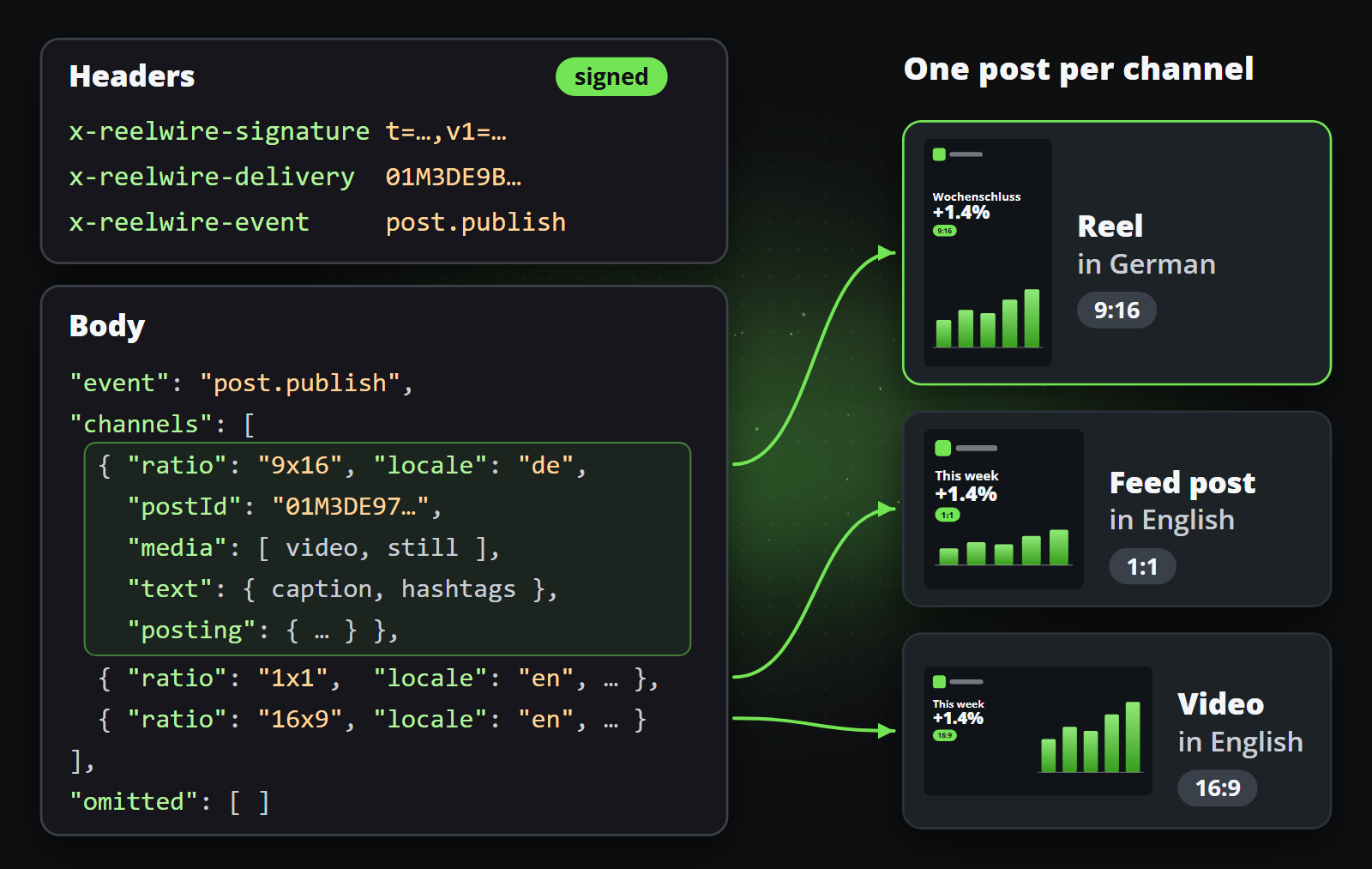
When a post is due, one request per hand-over: a post going to three channels with Handed over by
webhook on that need no approval arrives once, with all three in channels; a channel that needs
approval arrives on its own once it is approved. A channel with webhook off is never in channels,
even when it goes out in the same hand-over by email or by its platform connector. Each channel
carries its video (and its cover picture), its text as that platform takes
it (in four lengths, in captions, for a channel on No specific platform), its posting settings in
posting, and the ids to report back with. Channels of the same post left out of this request are
named in omitted, with the reason and whether they follow.
Later, the same address receives post.update when somebody changes a post that was handed over,
and post.delete when somebody asks for it to be taken down, each time with Webhook left on in
the request's dialogue on Posts. The x-reelwire-event header says
which. Resend post request there sends the post again as a new post.publish, with a new delivery
id, so your receiver acts on it again.
Trust it
- Check the signature on the raw body, before parsing it:
x-reelwire-signatureist=<unix seconds>,v1=<hex>, andv1is the HMAC-SHA256 of<t>.<raw body>with your signing secret. Compare in constant time. - Refuse a stale timestamp: more than 300 seconds away from your clock is a replay.
- Act on a delivery once:
x-reelwire-deliveryis the same on every retry of one delivery. Record it only after you have finished with it, so a failure halfway lets the retry through. - Verify the video after downloading it against its
sha256. The links work for seven days from each send.
In Node, the check is a few lines:
import { createHmac, timingSafeEqual } from "node:crypto";

export const fromReelwire = (rawBody, header, secret) => {
  const parts = Object.fromEntries(header.split(",").map((part) => part.split("=")));
  if (Math.abs(Date.now() / 1000 - Number(parts.t)) > 300) return false;
  const expected = createHmac("sha256", secret).update(`${parts.t}.${rawBody}`).digest("hex");
  return parts.v1?.length === expected.length && timingSafeEqual(Buffer.from(parts.v1), Buffer.from(expected));
};
Answer, then work
Answer with any 2xx straight away, and post afterwards. The answer only says the request arrived: it publishes nothing, and one that takes longer than 30 seconds counts as a failure and is sent again. So does a redirect: Reelwire does not follow it, so give the address that answers itself. A request that fails is retried after 10 seconds, a minute, five minutes, a quarter of an hour, an hour and two hours, and then given up; a post that no way out got through then reads POST FAILED on Posts, with the reason, and Resend post request under More there tries it again. What went out on the Activity screen shows every attempt, Details shows what a request carried and what came back, and Deliver again sends one once more, with the same delivery id.
Say what happened
Reelwire shows a channel's post as Handed over until somebody says what became of it. Your receiver says it, per channel, with an API key, made on the API keys screen, that holds Posts write:
POST https://app.reelwire.io/v1/posts/{postId}/report
Authorization: Bearer rw_...
Content-Type: application/json

{ "status": "published", "url": "https://www.youtube.com/shorts/...", "platformPostId": "..." }
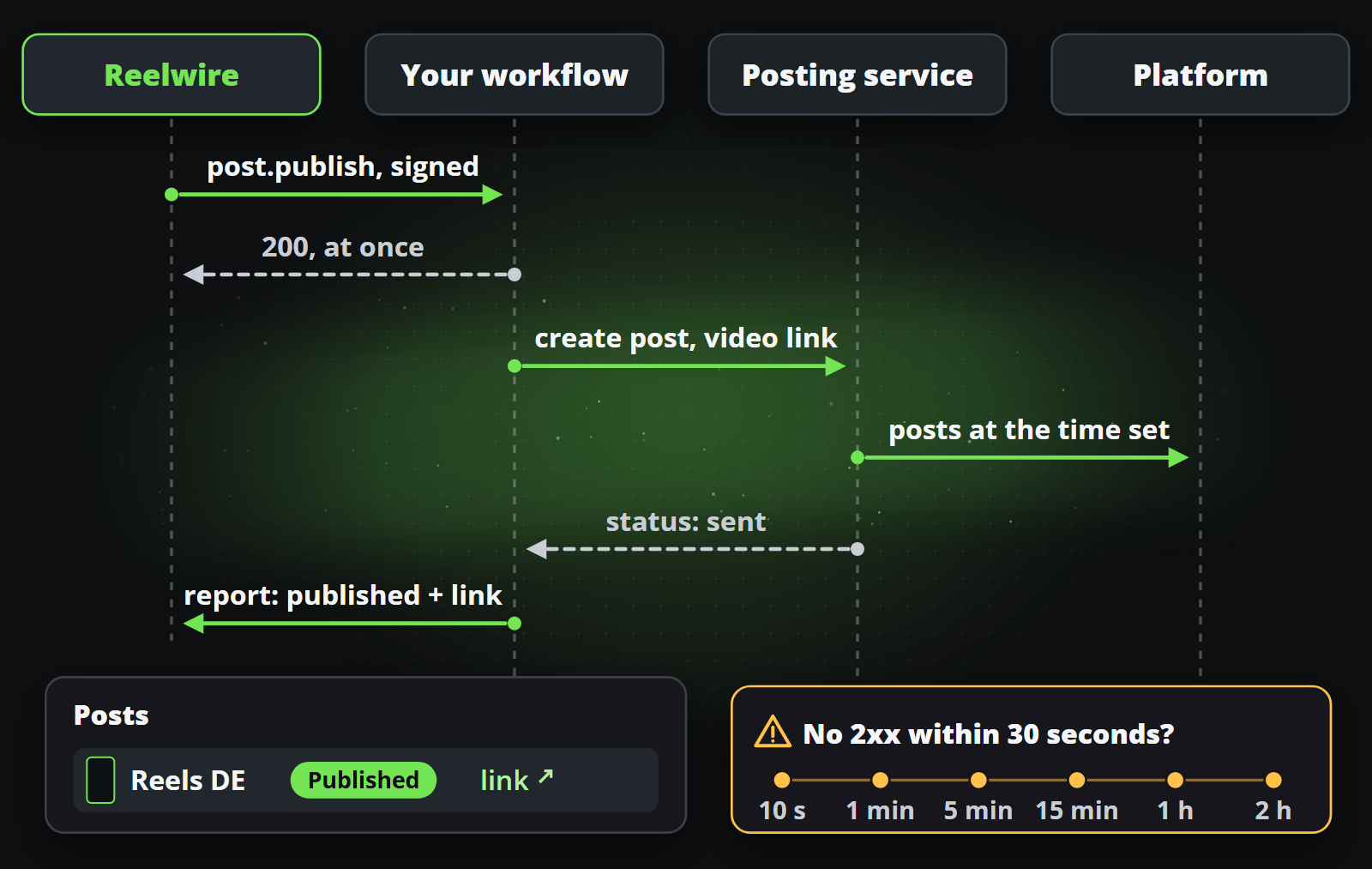
postId is channels[].postId from the request. The status is one of:
| Status | When |
|---|---|
published | It is up. Send its url, and the platform's own id as platformPostId if you have one: both come back to you in a later post.update or post.delete, as permalink and platformPostId, so you can find the post again. |
skipped | You decided not to post it. |
failed | It could not be posted. Send a reason: the Posts screen shows it, and a person can post it by hand. |
deleted | You took it down after a post.delete. |
Saying the same thing twice is fine. Anything the post's state does not allow is answered 409 with the state it is in, such as skipping a post already reported published.